Rethinking network access
 By Dr.-Ing. Andreas Walter, Founder & CEO ·
For thirty years, getting into a network from outside meant opening a door in it: a forwarded port, a VPN gateway, a remote-desktop server on the internet. I think the door itself is the problem. Here is how we built Awacino without one.
The door is the problem
Every classic way into a network starts the same: something inside it waits for connections from the internet. A port forwarded to the office PC, a VPN appliance at the edge, an SSH server open to the world. Whatever waits can be found - scanners sweep the whole internet around the clock, and a door that answers gets tried, day and night.
The figures we collected on our security page are sobering: 22 % of exploited vulnerabilities hit edge devices and VPNs (Verizon DBIR 2025), 56 % of attacks came in through external remote services such as firewalls and VPNs (Sophos 2025), and about 1.8 million remote-desktop servers are reachable on the internet (Forescout, April 2026). The VPN gateway, meant as the lock, has become one of the most attacked doors.
Dial out, meet in the middle, step aside
Awacino turns the direction around. The device in your network - a PC, a Mac, a Raspberry Pi, a NAS or a server - dials out, and so does your phone or laptop. Our servers do one thing: they introduce the two ends to each other. Then the two find a direct path and encrypt it end to end. From that moment on your data runs between your own devices, never through us. We cannot see it, because it does not pass us.
What this means for the office network is simple to state:
- No inbound port on the router or the firewall - nothing for a scanner to find, nothing to brute-force.
- No VPN gateway on the internet that needs the next emergency patch.
- The device that lends its network runs unprivileged, so there is less to exploit.
- Access is per device and per code: a Beam-in code belongs to the first device that redeems it, it can reach the whole network or only one screen, and you pause or revoke it at any time - it stops working at once.
The details are on our Technology pages.
A real address, not a parallel network
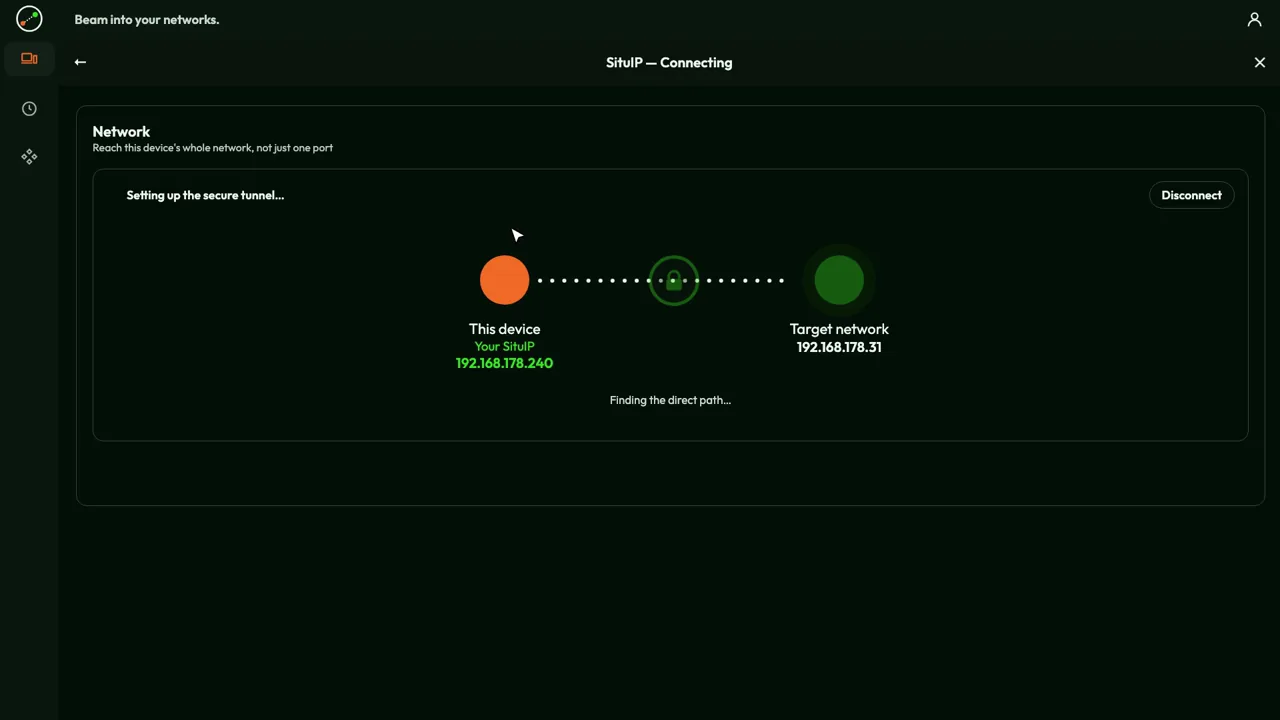
The second idea is the one I am proudest of. When you beam out, your device gets a SituIP: a real address inside the network you beamed into, often leased by that network's own router. Your phone in a hotel becomes, say, 192.168.2.47 in your office. The printer at 192.168.2.20 is still at 192.168.2.20, the NAS keeps its address, the admin page of the router opens where it always opens. No documentation needs rewriting.
Overlay networks such as Tailscale or ZeroTier take a different, perfectly valid approach: every device joins a separate virtual network with its own addresses - with Tailscale from the 100.64.0.0/10 range, for example 100.101.102.103. To reach a machine you install their client on it, or you set up a subnet router that forwards into the local network. That works well, but it is a second network beside the real one. With a SituIP there is only one network: the one that is already there. You install Awacino on one device in it, not on every machine you want to reach.
To be precise: if your own network uses the same address range as the one you beam into, or there is no network to lend, Awacino falls back to a private 100.64.x.x address as well.
Your own tools work unchanged
Because you are in the network, you need no special remote software for each service. You use the clients you already have: Windows Remote Desktop (mstsc is already installed on Windows), VNC or macOS Screen Sharing, your SSH client, the file share in the Explorer or Finder, the database client, the web interface of the NAS or the machine. Everything answers at the address it already has.
| Approach | What you install | How you reach things |
|---|---|---|
| Port forwarding | nothing - but a port is open to the world | the public address of your router |
| VPN gateway | an appliance plus a VPN client per user | the network, through the gateway |
| Remote-control tools | their agent on every machine you want to control | one screen at a time |
| Overlay networks | their client on every machine, or a subnet router | virtual addresses (e.g. 100.x.y.z) |
| Awacino SituIP | the app on your device and on one device in the network | the usual addresses inside the network |
Where the old ways get stuck
Many home and mobile connections no longer have a public address of their own: they sit behind CGNAT at the provider, and 5G routers almost always do. Port forwarding simply cannot work there, and you would not want it to. Awacino finds its direct path behind CGNAT and on 5G mobile networks too, with no static IP and no router configuration.
For machines nobody sits at - a server, a NAS, a Raspberry Pi in a machine or in the lab - there is the Unattended Client. It runs headless, with no admin rights, and makes its network ready to beam into with nobody logged in. And a cloud server can be beamed into the office the same way, so it reaches the office database by its usual address while both firewalls stay closed.
What it costs compared with a VPN
A VPN is rarely expensive because of one invoice. It is expensive because of what you have to run and what you pay for per person. So instead of comparing amounts, which differ from vendor to vendor, let me compare what you actually pay for.
| Usual VPN solution | Awacino | |
|---|---|---|
| Hardware or server | a VPN gateway or appliance, or a VPN server you run yourself | none - a device that is already in the network lends it |
| Upkeep | firmware and security updates, often urgent; often a yearly support or security subscription for the appliance | app updates; nothing waits on the internet that needs an emergency patch |
| Licences | per person: VPN client licences, or a per-user cloud VPN or ZTNA subscription | per slot: each device with Awacino and each active Beam-in code; people are never counted |
| Admin time | user accounts, client profiles, firewall rules, certificates | the person at the machine sets it up; codes are paused or revoked in the app |
| To start | a project | free with 2 slots |
To be fair: if you already run a firewall you trust, keep it - Awacino does not need a port in it, and cloud VPN and ZTNA services take the appliance off your hands too. What changes with Awacino is what you pay for: not a box and not heads, but the devices and codes that really have access. Commercial plans for teams come in sizes of slots and log sign-ins, connections and Beam-in codes - never the content. The plans are on our pricing page.
If you want to see it in your own setup, download the app, or join our testers. Why we think this is the better way in, in four points: Why Awacino.
Videos
About the author
Dr.-Ing. Andreas Walter founded Awacino and designs its network technology.